Recherche Entreprise
Introduction
The Recherche Entreprise connector allows Salesforce users to search for French companies in real-time, retrieve verified business information from official national databases (including the SIRENE registry operated by INSEE and other government-managed sources), and then populate Salesforce records efficiently. It uses configurable mapping rules to determine how results appear and where the data is stored in Salesforce.
🌐 API Documentation: https://recherche-entreprises.api.gouv.fr/docs/
✅ Typical use case: Quickly create or enrich Account records with official company information.
Demo — How the Connector Works
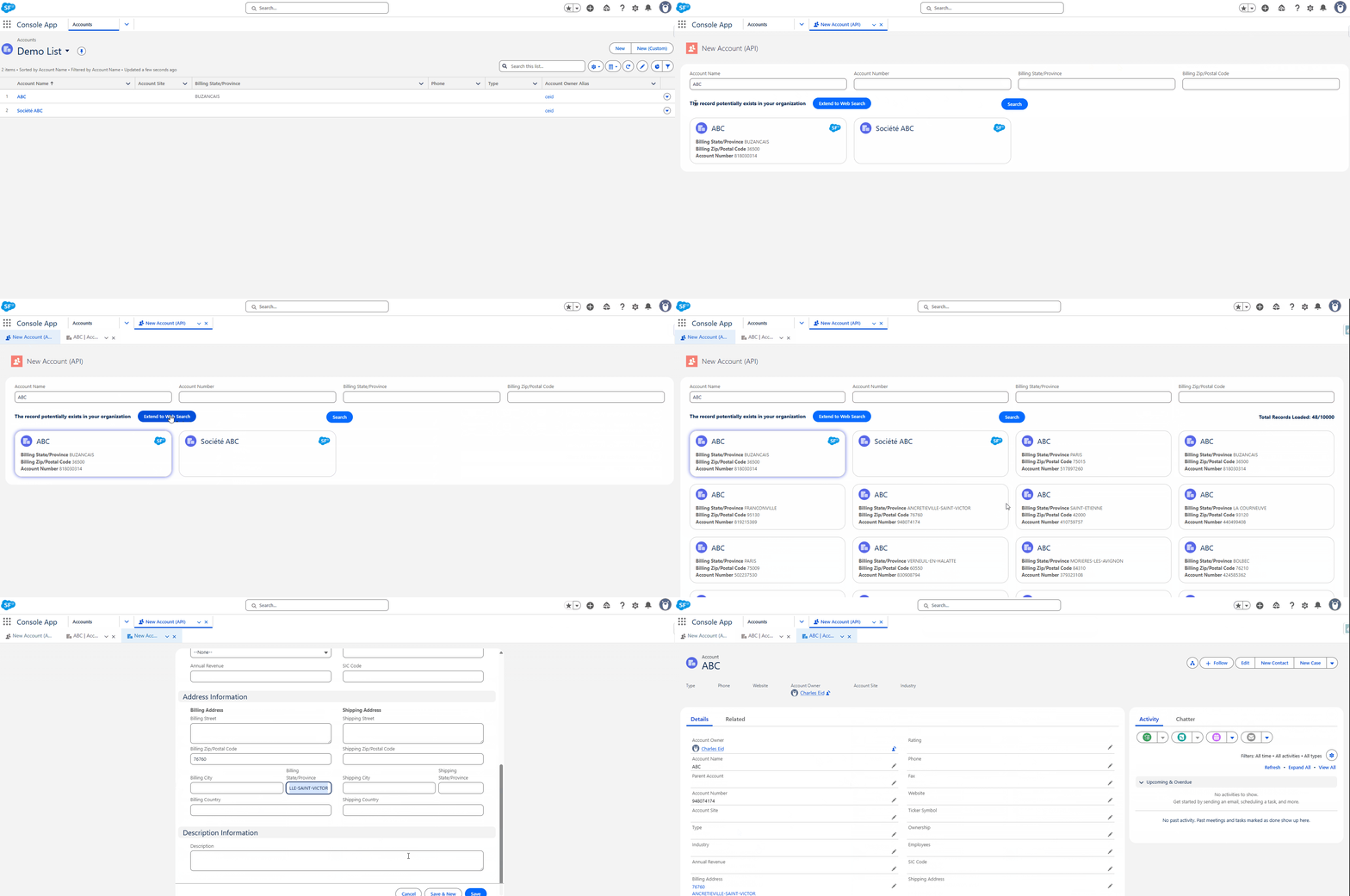
The following demo illustrates how a user can search for a company, check existing Salesforce records, and create a new company record with information retrieved from the API.
How Does It Work?
Authentication
The Recherche Entreprise connector uses secure authentication to access the external API.
Authentication is handled automatically through a Named Credential + External Credential setup delivered with the solution.
This ensures secure access to the enterprise data source without requiring the administrator to configure API security manually.
ℹ️ No client-side authentication setup is required — credentials are packaged and maintained by the implementer.
Five Custom Objects
To enable the Recherche Entreprise API to interact with Salesforce, you need to configure the connector using four main custom objects. These objects define the connector, the Salesforce target, the fields to map, and the search filters:
- Data Connector – Represents the connection to the external API by defining the type of connector.
- Data Table Definition – Links the connector to a specific Salesforce object (Example: Account) and optionally to specific record types. This determines where the API data will be applied.
- Data Attribute Mapping – Maps fields from the external API response to Salesforce fields, defining how data is imported into Salesforce records.
- Data Search Mapping – Defines the search parameters and filters used to query the external API, controlling how and what data is retrieved.
- Data Code Mapping – Defines the translation layer between raw external API codes and standardized internal values. Each mapping links a code to a human-readable label, ensuring consistent normalization for picklists, dropdowns, status fields, etc.
Lightning Web Component (LWC)
At the core of the connector is a reusable Lightning Web Component that provides the search interface and data-preview experience.
The component dynamically adapts to configuration settings:
- Data Connector Type — determines which external API to call, in this case the
Recherche Entreprise API - Salesforce Object Name — defines where data will be stored (Example:
Account) - Field mappings & search filters — drive search fields, results display, and record population
💡 The component can be used in list views, record pages, or opened via custom buttons or tabs, depending on your configuration.